Cincinnatus
Members
-
Joined
-
Last visited
-
Das, Olydemon, Aus, John - great looking pieces! Guess I need to get off my rear and finish some pieces.
-
Wow - really impressed with that opener Jeremy - great job!
-
Great job - I like the industrial look.
-
Now I see what you mean about a pain without a brake! Once you see the beam you realize how big the brackets are.
-
Very nice Das - what is the thickness of the beam?
-
Very nice - keep posting pics so we can see the progress.
-
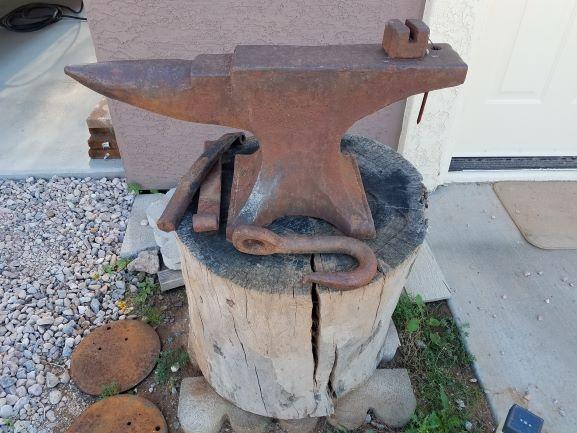
Nice that the persistence paid off. I have a relative that has this Peter Wright sitting in the yard - I need to start begging.
-
I agree - after 25 years as an Electrical Engineer doing power distribution in buildings - I don't trust myself all the time either.... As I always tell everyone that asks for advise and is not comfortable working with electricity - call an Electrician - cheaper than a house fire.
-
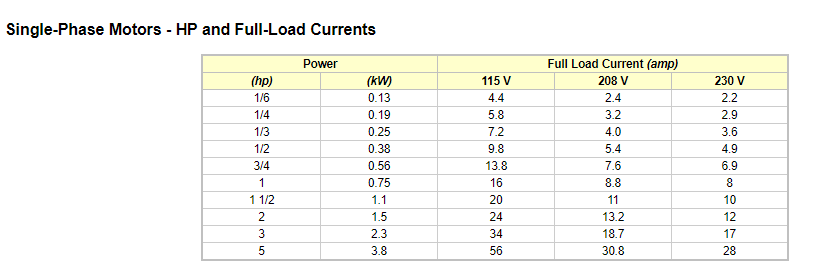
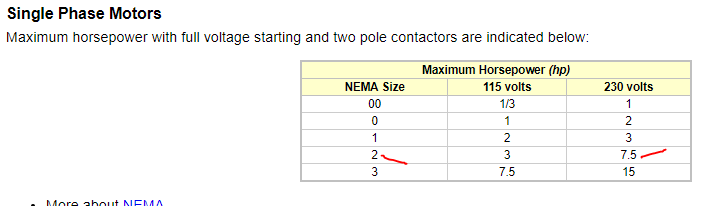
A single phase 230 VAC, 5 HP draws 28 amps. 30 amps would work but be tight. I would opt for a 35 Amp switch. The other option mentioned is a starter - you will need a NEMA size 2 for the motor, pretty standard - just search the web. NEMA size 2 is designed to handle a motor up to 7.5 HP.
-
The list of Trenton anvils says 1904.
-
Very nice - already downloaded a few images. Thanks for the link.
-
Thank You.
-
With Valentine's Day coming up - I made this for my wife. First go at making a flower and played around making a vase.


-
-
Nice looking blades!