October 6, 20169 yr Just wanted to say hi to everyone; just got an old riveters coal forge, a large leg vice and an anvil. I started playing with a railroad spike today. Twisted and pounded it out to my main shape; I'm going to heat treat it tomorrow and then sharpen it. We'll see how it turns out, fingers crossed.
October 6, 20169 yr Welcome aboard Skoob glad to have you. If you'll put your general location in the header you might be surprised how many of the Iforge gang live within visiting distance. Forget heat treating a RR spike it doesn't contain enough carbon to harden. Spikes are formulated so they CAN'T get hard, nobody wants a spike snapping and letting a train go it's own way. We'd like to see pics, we LOVE pics, your projects, shop, tools, scenery, well about anything you'd show a young child to whom you didn't want to have to explain adult topics. Frosty The Lucky.
October 6, 20169 yr It might work for YOU but not the spike. Even the ones marked HC have a maximum ACCEPTABLE carbon content around 30 pts. Straighten it out and narrow the profile and they make nice letter openers. Products made from RR spikes are popular, folk are attracted to things they can see the transition from the origin to the finished product. Almost everybody recognizes a RR spike and being able to trace it from the original to the finish form by feel and eye is a HUGE marketing plus. Frosty The Lucky.
October 6, 20169 yr Author Here are some pictures of what I have available to work with. I was told that the anvil was an absolute steal and is worth far more than the entire purchase price for everything.
October 6, 20169 yr post vises are worth a fair bit too, how much did you get it all for? if you don't mind me asking.
October 6, 20169 yr 1 hour ago, SkoobyNewb said: I was told that the anvil was an absolute steal and is worth far more than the entire purchase price for everything. Understatement of the year. Depending on your location, even the vise is possibly worth your purchase price. Re: location, as Frosy said it can matter. User/Settings, add general location & save. Sometimes answers are mitigated by where your cast a shadow.
October 6, 20169 yr Author 38 minutes ago, aessinus said: Re: location, as Frosy said it can matter. User/Settings, add general location & save. Sometimes answers are mitigated by where your cast a shadow. I cant seem to be able to see where i set my location.
October 6, 20169 yr I'm tech chalanged, so I can't help you with that, but I can offer my welcome. Nice kit, do it proud
October 6, 20169 yr 1 hour ago, SkoobyNewb said: I cant seem to be able to see where i set my location. provided you're using a web browser on a PC with a decent resolution, you can do the following: log in on the site click the triangle by your login name that's at the top-right of the screen, then click profile click edit profile, which will be in a grey box in the top-right of a bigger grey box toward the top...ish of the page. scroll down to the section just below where it says "Profile Information" in bold characters and location should be the 2nd option down, just below gender and above interests and regarding your purchase price, all that kit for 150 is an absolutely phenomenal deal, whoever sold it to you must really like you.
October 6, 20169 yr Welcome aboard skooby. Great score on the kit. As as for the spike knife, don't bother trying to heat treat it but finish it out and keep it to look back on.
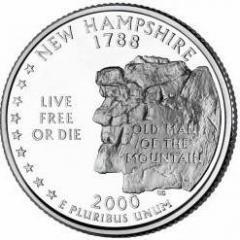
October 6, 20169 yr Nice steal...err, deal! The anvil alone is probably worth at least twice what you paid. I'd guess location is New Hampshire, by the coin pic, but maybe I'm making a big assumption.
October 6, 20169 yr 2 hours ago, Juc said: provided you're using a web browser on a PC with a decent resolution, you can do the following: log in on the site click the triangle by your login name that's at the top-right of the screen, then click profile click edit profile, which will be in a grey box in the top-right of a bigger grey box toward the top...ish of the page. scroll down to the section just below where it says "Profile Information" in bold characters and location should be the 2nd option down, just below gender and above interests Best explanation I've seen. Marked.
October 6, 20169 yr Author I believe I set my location, thanks for the advice guys. I did end up (if not just to try something new) heat treat the spike knife with some super quench. I can say that it is noticeable harder. Definitely not like true hardened steel, but a noticeable difference. Working on some tongs now, since the ones that i used on tue the knife just aren't right for the job.
October 6, 20169 yr WELCOME TO THE SITE, I would like to help ya get it set but you still havent told us where you are. Since you havent, I dont know what to set it too for you ? ps If you did change it in the correct place, you need to scroll to bottom of page to SAVE the information
October 6, 20169 yr Author I am in New Hampshire, I thought I did click save but I guess I didn't. I am using a phone to access the site not a pc, if that makes any difference.
Join the conversation
You can post now and register later. If you have an account, sign in now to post with your account.