August 30, 2025Aug 30 Having lost my bending fork one too many times, I had the thought that I could permanently mount some on a leg of my vise stand. So here they are: There are differently sized gaps on either side: You’ll notice that there’s also a bit of pipe welded onto the stand; this will be for making S-hooks. Here’s a demonstration of how it will work, using election sign wire instead of hot metal:
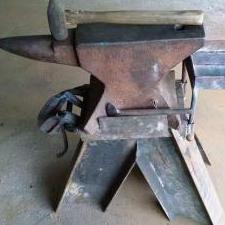
August 30, 2025Aug 30 Farriers anvils sometimes have turning ears (Cams?) cast on as seen in the image below. Welding bending forks on your anvil stand is one of those head slapper, DUH moments. Good move John Frosty The Lucky.
August 30, 2025Aug 30 Genius! I'm definitely tucking this idea away to implement when I make my new anvil stand!
August 30, 2025Aug 30 In the fist pic i thought you meant the small double hook thingy directly under the vise. I thought that is an inconvenient placement and those will never hold up to hot work. Then i scrolled down. Cool idea, .
August 30, 2025Aug 30 Author That’s where I hang the hook I use for dragging heavy stuff around the shop. (Note the bending wrench hanging on the other leg.)
September 3, 2025Sep 3 Author On 8/29/2025 at 8:41 PM, JHCC said: You’ll notice that there’s also a bit of pipe welded onto the stand; this will be for making S-hooks. I’ve added a lever to hold the stock against the jig. This can be positioned either to push down on the workpiece: Or up: And hangs down when not in use:
September 3, 2025Sep 3 Holding up, looks good but it takes two hands holding down. One for the twisting wrench one for the stop, that might be good if you have to reposition the stock frequently though. I'll have to see what you think after using it a while. Frosty The Lucky.
September 3, 2025Sep 3 Author It’s a two-handed operation regardless of the orientation: stock in the left hand and the handle of the lever in the right. Since either hand can push down or pull up, there are four possible ways to use the jig: Down on handle and workpiece: Down on handle, up on workpiece: Up on handle, down on workpiece: Up on handle and workpiece: This morning, I added a spring to the lever pivot, to hold it in its proper place while in use and allow easy changeover between working positions.
September 3, 2025Sep 3 Ah, I thought you used the bending wrench hanging on the leg but not for stock this light. Makes sense. You use the vise grips when using the bending wrench. I'll have to make a couple sketches, I think an adaptation of one of our old rod dogs would work a treat. An eccentric wheel on a pin the stock slips moves the dog easily one direction but the harder it tries to slip the harder the dog holds it going the other way. Being an mild eccentric it would be pretty insensitive of stock thickness within reason, say 1/8" - 1/2" on a larger version. To change from up to down just slide the dog off the pin turn the other face in and slip it on. Just a small lip would keep it on the axle pin. Uh, no wait maybe not. Hmmmm. I gotta dig out the graph paper, I'll get back as soon as Windowz decides to let me cut and paste a pic. Frosty The Lucky.
September 3, 2025Sep 3 Author The bending wrenches (I have two big ones) were living on the vise stand even before I got the idea for this bending fork project, and I'll certainly be able to use the wrenches and the leg-mounted forks for larger projects. The jig on the side of the top of the stand is for light-duty jobs like S-hooks, and I doubt I'll need anything fancier or more robust than the lever shown above. This has the advantage of always being there, which means that I won't have to go hunting for another tool or worry about putting it away when I'm done. Come to think of it, since all of this is mounted on the vise stand, once I've bent the two ends of the S, I'll be perfectly positioned to twist the center section (assuming there's enough heat left in the workpiece). Looks like I need to add a hook or bracket for a twisting wrench....
September 3, 2025Sep 3 It'll be a while before I can post a sketch of the eccentric I was talking about, seems something decided to update on my comp. First the mouse wheel was enlarging and shrinking the view, then odd things then stopped. The only thing I could find in blue tooth devices was a notice it was updated and do I want to add a device. The comp can't find the mouse, evidently it isn't detectible now. I think I'll let the whole shooting match steep in it's own juices for a while and see if it figures itself out. I can't. Hope I'll see you guys again. Later, Frosty The Lucky.
September 7, 2025Sep 7 Author So, made an S-hook to try out the levered bending jig, and found it a bit awkward. Shortening the arm very slightly and changing the size and shape of the bit on the end worked nicely. The hook on the bottom is from the unmodified version. I don’t know if you can tell from the photo, but it has a short straight section just before the terminal curl. The modified version eliminates this, as in the upper hook. On a side note, the stock for these is from some salvaged 1/4” rebar, flattened to leave a hint of its former texture on the edges.
September 7, 2025Sep 7 The tweak to the bit shortened the straight section before the finial scroll but didn't eliminate it. I don't know if you can eliminate that bit of straight start almost any scroll bender I've ever used has left one. I was wondering about the texture. I like it, good call. Frosty The Lucky.
September 7, 2025Sep 7 Author I think a longer taper or a slightly hotter workpiece would probably have a greater effect than any additional changes to the jig at this point.
September 7, 2025Sep 7 The only sure way I've know of to eliminate that short straight section is to pre-forge it before using the bender. More taper or something else might work, I doubt it but what the hey. Frosty The Lucky.
Join the conversation
You can post now and register later. If you have an account, sign in now to post with your account.