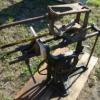
April 6, 201313 yr This hacksaw I got at an auction for $3.50 ,I put a 1/3 HP motor on it and fixed a small broken cast peace. Today I bolted down to my shed floor and fired it up, it runs great and sounds like an old steam engine. Its a Fairbanks hacksaw and it looks to be pat in 1903. CUTS GREAT!!!! daynee
April 6, 201313 yr Greetings Daynee, Thats a neet saw... Its called a drag saw. I have 3 .. 2 running in my line shaft shop and one for looks...... Miller falls 1902 that self disengages when the cut is done .... and a 40 ish Marvel.... Put a little bees wax on your blade and you will see an inproved cut.... Looks like your havin fun.. Carry on. Jim
April 6, 201313 yr Author Nope, just $3.50 :) That's a cool hacksaw! Was that price a typo? I think you got your moneys worth.
April 6, 201313 yr Ah! Jealousy! Especialy when you know it will not get you one like that... Hurts. And $3.50? Congrats.
April 6, 201313 yr Nice machine. It's hard to tell from the picture, but it might benefit from a sheetmetal guard to keep chips out of the electric guts.
Join the conversation
You can post now and register later. If you have an account, sign in now to post with your account.