Daynee
Members
-
Joined
-
Last visited
Everything posted by Daynee
-
Nope, just $3.50 :)
-
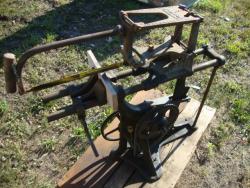
This hacksaw I got at an auction for $3.50 ,I put a 1/3 HP motor on it and fixed a small broken cast peace. Today I bolted down to my shed floor and fired it up, it runs great and sounds like an old steam engine. Its a Fairbanks hacksaw and it looks to be pat in 1903. CUTS GREAT!!!! daynee
-
Thanks all !!!!!!!!!!!!!!!!!!!!, I just put a smaller pulley on the motor and it works great, I could buy a new drill press, I don't really care about how much it costs, but I fine it cool to use something my great uncles use back in their hay day!, I think I might try to make a guard for it tho. Daynee thanks
-
Thank you! I got this at an auction for I think $3.50 ,couldn't turn that down, but ya that's the sad part is ,there is no crank and auto feed lever with it or else I would love to convert it back.I have one with the crank and it works great! thanks dayne
-
I HAVE THIS OLD DRILL PRESS WHICH HAS BEEN CONVERTED TO V-BELT POWERED, I JUST MOUNTED IT ON THE WALL WITH THE MOTOR, I COULD LOWER THE SPEED ,BUT DO I NEED TO. EVERY TIME I START IT UP I PUT OIL ON THE GEARS AND IN THE BUSHING HOLES, IT SPINS FAST ABOUT TWICE AS FAST AS THE HAND CRANK WOULD HAD SPUN IT. WHAT DO YOU GUYS THINK, SHOULD I TAKE IT OFF THE WALL AND ADJUST THE SPEED OR IS IT FINE JUST THE WAY IT IS,WILL THIS HARM THE GEARS, OR IS THIS FINE? THE REASON IM ASKING THIS IS BECAUSE ITS ALLOT OF WORK TO TAKE IT OFF THE WALL AND RE-BOLT IT, WHY DO THE WORK IF NOT NEEDED. THANKS DAYNE