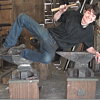
January 6, 201214 yr Hello everyone, I managed to get my hands on this nice anvil. It's perfect for demos, weighing 145 pounds. I know it's cast steel, even though it almost looks like it's cast iron. But since it rings louder than a bell, there is no doubt it's steel. I assume the "face plate" is from casting it and was left on there because there was no need for removing it. The hardness amazes me! It bounces a hammer like crazy and I bet you can dent a hammer quicker than the anvil itself. But the real question remains and that is:Who made it at what time? And who could tell me about KL, it seems like high quality, or this was just a lucky one that came out perfect. Here's some pics, sadly the flash on the camera gives a sort of ugly look to it, but here it is.
January 6, 201214 yr Author Aah yes. That says enough. Great that it seems to be high quality, sad there isn't much known about KL. But I at least know now it's English.
February 24, 201412 yr Sorry Alec,that doesn't look like a fisher,maybe a brooks type shape but not fisher IMO
February 25, 201412 yr I asked about KL on here a while back. They were a British cast steel maker. You see some with "made in England" cast on them. Very good anvils apparently. But seeing as this thread is two years old, I'm guessing the OP knows that by now. Andy
Join the conversation
You can post now and register later. If you have an account, sign in now to post with your account.