July 7, 201610 yr I'm sure someone has tried it...I'm thinking of using a Tie tod end out of our grape harvester at work for making different hardy tools. I've got 8 of them. Can someone give me some insight as to if they will work for making a hot cut. I've never made one before but a guys gotta start somewhere. It has to be somewhat hard due to the abuse it withstands. I really don't know thinking out loud I guess.
July 7, 201610 yr It should work just fine. Square up the small end to fit your hardy hole. Forge the round end to a fan shape, grind an edge and you're good to go. Not much need to heat treat since the hot cut will be harder than the hot metal you are cutting. Just don't be whacking on the edge with your hammer.
July 8, 201610 yr That'd make a nice little ball stake or perhaps a snarling iron. Keeping a bucket of them around the shop would be a true bit of honorable scrounging. Frosty The Lucky.
July 8, 201610 yr Author 15 hours ago, Frosty said: That'd make a nice little ball stake or perhaps a snarling iron. Keeping a bucket of them around the shop would be a true bit of honorable scrounging. Frosty The Lucky. had to do a google search on that one. very cool! just got done forging it pretty happy with it, ill post a picture once i get it finished. thanks fellas!
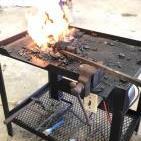
July 9, 201610 yr Author The hot cut was a success. But im even more excited about my tongs. After 4 failed attempts I finally made my first set of tongs. They're not the prettiest but they'll work.
Join the conversation
You can post now and register later. If you have an account, sign in now to post with your account.