Skip to content
View in the app

A better way to browse. Learn more.

I Forge Iron

A full-screen app on your home screen with push notifications, badges and more.

To install this app on iOS and iPadOS
  1. Tap the Share icon in Safari
  2. Scroll the menu and tap Add to Home Screen.
  3. Tap Add in the top-right corner.
To install this app on Android
  1. Tap the 3-dot menu (⋮) in the top-right corner of the browser.
  2. Tap Add to Home screen or Install app.
  3. Confirm by tapping Install.

Hart’s Hug

Featured Replies

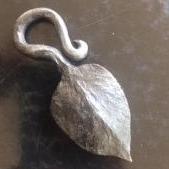
A wedding gift for my buddy B. Hart and his lovely bride to be. I think it should go on the cake. IMG_2848.thumb.jpeg.f26eb196830ee9cae8b60ab6dfdd27c1.jpeg

IMG_2850.thumb.jpeg.d32ca63700e05783d194eb869db022e9.jpeg

For a bit of humor, I pointed put that my bud is a bit on the heavy side. He will get it :-)

IMG_2849.thumb.jpeg.d1d281be53dd03c6efa1d89ae6332b21.jpeg

thanks for looking. 

Nice work Rojo. I'm sure it will be a cherished gift. 

Of course it should go on the cake! A pin in the bottom that reaches to the plate will prevent settling or tipping. 

Nice piece Pedro, well done!

Frosty The Lucky.

  Very nice, Rojo, I really like the heart.  Don't forget to take a photo of it on the cake....:)

Join the conversation

You can post now and register later. If you have an account, sign in now to post with your account.

Guest
Reply to this topic...

Account

Navigation

Search

Search

Configure browser push notifications

Chrome (Android)
  1. Tap the lock icon next to the address bar.
  2. Tap Permissions → Notifications.
  3. Adjust your preference.
Chrome (Desktop)
  1. Click the padlock icon in the address bar.
  2. Select Site settings.
  3. Find Notifications and adjust your preference.