January 2, 20206 yr I've long noticed how anvils in use seem to attract other anvils. They are like Decoys for the TPAAAT. I had an anvil once that had a bunch of "crush damage" it had seen hard use in the mines in AZ.
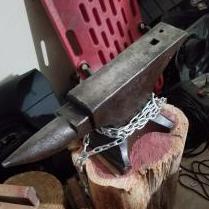
January 11, 20206 yr Author What with the wind blowing in ~25mph gusts, I figured reassembling and firing the forge might not be wise. Instead I wire-brushed the 150 and BLO'd it. I've never used that stuff... it smells like fish funk and must hahaha... I think I prefer Sea-Foam fogging oil. Ahhh, oh well. I found an anchor. Whether an inspection mark or a sign of naval service, it is still awesome. I found a couple points that look suspiciously like cracks. I'll have to perform some verification before repair. Regardless, it is still a sweet anvil. I also used the MAP torch on some small stock just because. Noticed the decreased rebound, but it still worked!
January 13, 20206 yr if i remember correctly the anchor stamps means that it was in use for the military. Damian Stil
Join the conversation
You can post now and register later. If you have an account, sign in now to post with your account.