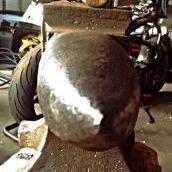
October 9, 20169 yr So I scored a small arm and hammer tonight, stamped 111 but I haven't put it on a scale yet. Got some chipping but overall it's pretty good shape. EXCEPTIONAL rebound. Gotta love my A&H's!
October 9, 20169 yr lovely shape and a real convenient size. I consider the A&H's to be a great anvil for doing ornamental work with.
October 9, 20169 yr Author I kinda down traded on it. I had a 265 lb Budden, it wasn't bad. Had a pretty good ring but the face was kinda soft. Only had around 50 60 rebound. But one side was completely unused, didn't have any visible makers marks though besides the serial# and the batch number, and the other number under the horn. I forget which one that stands for. So I traded it for this smaller one with some cash.
October 9, 20169 yr Black Frog will ask you to take a picture of the logo and post it. He is trying to develop a data base of the different logo formats for A&H and Trenton.
October 9, 20169 yr Very nice! Yes, would like to see a close-up pic of the side logo stamp! Every new entry helps the database... :-)
Join the conversation
You can post now and register later. If you have an account, sign in now to post with your account.