Skip to content
View in the app

A better way to browse. Learn more.

I Forge Iron

A full-screen app on your home screen with push notifications, badges and more.

To install this app on iOS and iPadOS
  1. Tap the Share icon in Safari
  2. Scroll the menu and tap Add to Home Screen.
  3. Tap Add in the top-right corner.
To install this app on Android
  1. Tap the 3-dot menu (⋮) in the top-right corner of the browser.
  2. Tap Add to Home screen or Install app.
  3. Confirm by tapping Install.

2 helpful things

Featured Replies

If my pics upload at right angles, clicking on them usually rotates them back to their correct orientation.

Not sure these are commonly used or not...

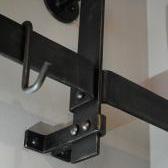
Mag drill vise bracket, speaks for itself really. Made mine in a hurry from scrap RSJ & a couple bits of angle.

If your pillar drill has keyless chuck and does up too tight on larger diameter bits a strap wrench around the collar gives you better grip to undo the chuck easily.

20160105_180414.jpg

20160105_180359.jpg

20160105_180840.jpg

  • 3 months later...

Wish I had a mag drill. <sniff> Good practical tips, thanks Joel.

Frosty The Lucky.

don't even want a key less chuck ??? why thats like having a reg chuck on a hammer drill rented one before to try out

well short story got a spline drive hammer drill LOL
Join the conversation

You can post now and register later. If you have an account, sign in now to post with your account.

Guest
Reply to this topic...

Account

Navigation

Search

Search

Configure browser push notifications

Chrome (Android)
  1. Tap the lock icon next to the address bar.
  2. Tap Permissions → Notifications.
  3. Adjust your preference.
Chrome (Desktop)
  1. Click the padlock icon in the address bar.
  2. Select Site settings.
  3. Find Notifications and adjust your preference.