August 28, 201510 yr I had this drain strain for a while and am gonna use it for my coal grate in my forge. I am only concerned because I know some drains are chrome, and others are stainless. Can someone tell me which it is? Thanks
August 28, 201510 yr Greetings F C,Way to thin. Won't last long. Back to the drawing board.. Forge on and make beautiful thingsJim
August 28, 201510 yr Author ok thanks, i will go get some bolts and make a grate out of them like what Glenn did.
August 30, 201510 yr Author speaking of brass, I saw a video of a guy on youtube and is a member here who casted a brass hammer head. I want to do this because i need a hammer that i can use for punches and chisels etc. My only concern is heating the brass. Is there a way I can prevent poisoning? Thanks
August 30, 201510 yr why cant you use a steel hammer with your punches if your only concern is heating up the metal you are not ready to do any castingHave you got $1000 to spend on PPE?how much experience do you have of casting?do you have the correct type of crucible?
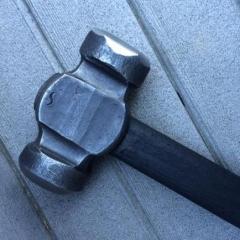
August 31, 201510 yr why cant you use a steel hammer with your punchesif your only concern is heating up the metal you are not ready to do any castingHave you got $1000 to spend on PPE?how much experience do you have of casting?do you have the correct type of crucible?All good points. Actually I use a stone mason's hammer. They are intended for striking Hardened steel tools. They have a short handle and a heavy square head.
Join the conversation
You can post now and register later. If you have an account, sign in now to post with your account.