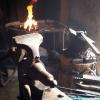
June 6, 201411 yr Boy it has been a good week, I picked this one up for a good price, the jaws are square and the screw is in mint condition. The jaw is marked 70 and "Conn"- I think Connecticut? I think it is a Columbian -Any input? Thanks
June 6, 201411 yr 70 is the weight Why do you think it is a columbian? The un faceted legs, short open ended screwbox, use of an U bolt in the mounting; common features in columbians...?
June 6, 201411 yr Looks like a Peter Wright or at least, a British vise of that period of manufacture.
June 6, 201411 yr Author 70 is the weight Why do you think it is a columbian? The un faceted legs, short open ended screwbox, use of an U bolt in the mounting; common features in columbians...? That description matches my other vise but not the one pictured here?
June 6, 201411 yr I agree with Frank. My Peter Wright has the maker's mark on the nut close to the contact point with the fixed jaw.
June 6, 201411 yr The one in the picture has a long closed screwbox, faceted (beveled) legs and not a U bolt; but a strap around the back leg for the mounting plate. Hence my surprise at the guess of it's being a Columbian. Of course marriages do occur and I have been known to do a Ubolt mount for other vises when needed.
Join the conversation
You can post now and register later. If you have an account, sign in now to post with your account.