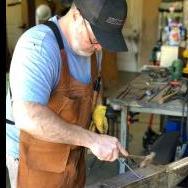
October 15, 201312 yr No where near finished but I worked on this Sunday at our local forge. It's made from 1.25" mild steel with a piece of 5160 (lawnmower blade) for the bit. This was just my second time forging. It was also my first time forge welding and it was successful on the first try. Something I'm proud of. Just need to finish my home forge so I can finish this project up.You can see the piece of 5160 in the end here.Here is where I am right now.This is the sample that the instructor brought.
October 15, 201312 yr Good job on the forge weld! Get your forge going and post more pics as you progress :) Dave
October 15, 201312 yr are you sure about the steel in the lawnmower blade? They can vary quite a lot!
October 15, 201312 yr Author are you sure about the steel in the lawnmower blade? They can vary quite a lot!The smith that was doing the demo brought the blade pieces and said it was 5160.
October 15, 201312 yr Welcome to the site,,,,,Nice piece of work for a first or for that matter it is a nice piece..period....And there are a few folks on here that look into specific areas that target their interests. There is a place covering tomahawks and axes that might get more views of this.....I suspect a mod may move it.. Keep at it and take lots of pics...
Join the conversation
You can post now and register later. If you have an account, sign in now to post with your account.