Skip to content
View in the app

A better way to browse. Learn more.

I Forge Iron

A full-screen app on your home screen with push notifications, badges and more.

To install this app on iOS and iPadOS
  1. Tap the Share icon in Safari
  2. Scroll the menu and tap Add to Home Screen.
  3. Tap Add in the top-right corner.
To install this app on Android
  1. Tap the 3-dot menu (⋮) in the top-right corner of the browser.
  2. Tap Add to Home screen or Install app.
  3. Confirm by tapping Install.

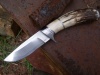
Stag and damascus folder

Featured Replies

Finished a folder a while back and thought I would post a pic of it here.
Thanks for looking

post-4209-0-07737800-1349893171_thumb.jp

Beautiful knife.

That is a sweet little knife. Pattern boldness really offsets the antler. Do you need me to carry this knife for you to keep it safe? I'd do that for you.....really! LOL Good work!

  • Author

Thanks for the comments guys

MAN, that knife is some kind of beautiful! Thanks for sharing it.

  • 2 weeks later...

I would be proud to test this little beauty out for you for a trial period of the next twenty years or so...lol.
Gorgeous piece, to be sure.

  • 5 months later...
  • Author

Rich,    No, that is not my steel.  I'm not sure who made it, I've had the steel a long time.

I havent made any damascus in a long time.

Thanks for the comment

Classy and well done....Is that your pattern weld steel?
Join the conversation

You can post now and register later. If you have an account, sign in now to post with your account.

Guest
Reply to this topic...

Account

Navigation

Search

Search

Configure browser push notifications

Chrome (Android)
  1. Tap the lock icon next to the address bar.
  2. Tap Permissions → Notifications.
  3. Adjust your preference.
Chrome (Desktop)
  1. Click the padlock icon in the address bar.
  2. Select Site settings.
  3. Find Notifications and adjust your preference.