Skip to content
View in the app

A better way to browse. Learn more.

I Forge Iron

A full-screen app on your home screen with push notifications, badges and more.

To install this app on iOS and iPadOS
  1. Tap the Share icon in Safari
  2. Scroll the menu and tap Add to Home Screen.
  3. Tap Add in the top-right corner.
To install this app on Android
  1. Tap the 3-dot menu (⋮) in the top-right corner of the browser.
  2. Tap Add to Home screen or Install app.
  3. Confirm by tapping Install.

Post vise Jim

Members
  • Joined

  • Last visited

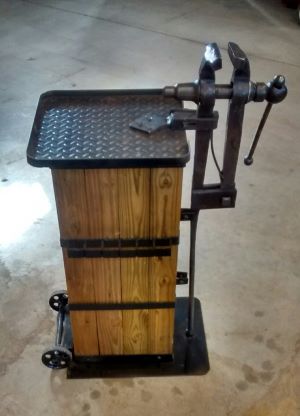
  1. Here's one of my stands that I took a picture of when it was new. I've used it for two years now and would make a few changes but overall I'm happy with it. I've use ideas garnished from others when I made it, so thanks. Jim
  2. Post vise Jim joined the community
  3. Here is my anvil stand. In version 2.0 I would move the wheels an inch closer to the base. The lifting arms store out of the way when not in use and extend (with stops) to move the anvil similar to moving a wheelbarrow. HTH Jim My anvil stand Handle extended

Account

Navigation

Search

Search

Configure browser push notifications

Chrome (Android)
  1. Tap the lock icon next to the address bar.
  2. Tap Permissions → Notifications.
  3. Adjust your preference.
Chrome (Desktop)
  1. Click the padlock icon in the address bar.
  2. Select Site settings.
  3. Find Notifications and adjust your preference.