keithgartner
Members
-
Joined
-
Last visited
Everything posted by keithgartner
-
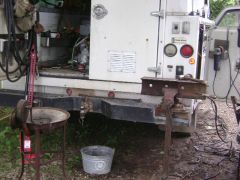 Truck has, electric, compressed air, welder, oxy/ac and 100' hoses, 50gals water. red jack to lift truck to put stand under vice, I hammer out bush hog blades in the field, you should hear it ring without a chain wrapped around track.
 -
-
Welcome back! You should join in on Chat, not that it always pertains to smithing, but you'll get ideas And real time answers to your spefic questions. Keith
-
I do mostly repair work, hammer-out rotary mower blades, make tuckpointing tools etc.. I'm starting into rendesvous, camping stuff.
-
I missed the t.
-
Oh, Sop it. You're kidding. Right?
-
The realy new one are reinforced lightweight concrete.
-
Hell'o, My nane is Keith Gartner, I live in Steelville, Missouri, about 100 miles south west of St. Louis. I've been practicing smithing on and off for 12 years, I belong to ABANA, and BAM, I'm not active at all, should be though. I make mostly camping tools, and rendesvouis trinkets, I copy everything I make, as I have the, artistry and imagination of a sewer lid, most of my work is rebuilding tools and equipment, hammering out bush hog blades, and such.