Skip to content
View in the app

A better way to browse. Learn more.

I Forge Iron

A full-screen app on your home screen with push notifications, badges and more.

To install this app on iOS and iPadOS
  1. Tap the Share icon in Safari
  2. Scroll the menu and tap Add to Home Screen.
  3. Tap Add in the top-right corner.
To install this app on Android
  1. Tap the 3-dot menu (⋮) in the top-right corner of the browser.
  2. Tap Add to Home screen or Install app.
  3. Confirm by tapping Install.

A couple of ideas from Prospect Hill Forge

Featured Replies

A couple of ideas from the Prospect Hill Forge blacksmithing school in Waltham, MA. 

A combination wire brush and flux spoon, for easier forge-weld prep:

IMG_8099.thumb.jpeg.d51523c07e694685939bdb5286a807e0.jpeg

(Also in this photo is one of their flexible “mats”, for shorter students to stand on to put them at the proper height relative to the anvil. It’s made of thick boards drilled through and strung on thin steel cable. They have two or three in different thicknesses.)

 A figure-8 loop of thin coil spring, to keep your vise handle where you left it:

IMG_8098.thumb.jpeg.416510016c53b95ef8335f3046fa224f.jpeg

I especially like the directions on the brush. Good ideas all, how well did the vise handle brake work?

Frosty The Lucky.

  • Author

Perfectly. 

  • Author

In fact, here’s one installed on my own post vise:

IMG_8113.jpeg

I'm going to have to find a couple small coil springs.

Frosty The Lucky.

  • Author

I got a 16” replacement closing spring for a screen door (the old-fashioned kind, not the new kind with an adjustable cylinder) at my local hardware store. This I cut in half and made into two loops, one for the post vise and the other for the big machinist’s vise. 
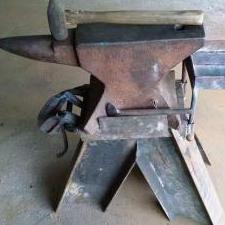
IMG_8112.thumb.jpeg.f70da4f9c0ca23aa51ff45708475e7b7.jpeg

Join the conversation

You can post now and register later. If you have an account, sign in now to post with your account.

Guest
Reply to this topic...

Account

Navigation

Search

Search

Configure browser push notifications

Chrome (Android)
  1. Tap the lock icon next to the address bar.
  2. Tap Permissions → Notifications.
  3. Adjust your preference.
Chrome (Desktop)
  1. Click the padlock icon in the address bar.
  2. Select Site settings.
  3. Find Notifications and adjust your preference.