Skip to content
View in the app

A better way to browse. Learn more.

I Forge Iron

A full-screen app on your home screen with push notifications, badges and more.

To install this app on iOS and iPadOS
  1. Tap the Share icon in Safari
  2. Scroll the menu and tap Add to Home Screen.
  3. Tap Add in the top-right corner.
To install this app on Android
  1. Tap the 3-dot menu (⋮) in the top-right corner of the browser.
  2. Tap Add to Home screen or Install app.
  3. Confirm by tapping Install.

Post vice stand

Featured Replies

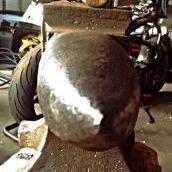
Made a stand for this bad boy. Solid 3x3 square stock for the neck, bottom plate is 3/4 and the top is 3/8. Not sure how much it all weighs but it's pretty solid.

image.jpg

image.jpg

image.jpg

image.jpg

 Benjaman, Is the plan to bolt it to the floor or weld this to a larger plate for stability? I like a larger shelf on top to lay tools and such. Nice build so far.         Life is Good            Dave

  • Author

The larger shelf of top is good idea. My plan right now is to leave it how it is. I found that base plate at work with the holes already in it.  When I get a more permanent workshop I plan to bolt it to the floor.
Join the conversation

You can post now and register later. If you have an account, sign in now to post with your account.

Guest
Reply to this topic...

Account

Navigation

Search

Search

Configure browser push notifications

Chrome (Android)
  1. Tap the lock icon next to the address bar.
  2. Tap Permissions → Notifications.
  3. Adjust your preference.
Chrome (Desktop)
  1. Click the padlock icon in the address bar.
  2. Select Site settings.
  3. Find Notifications and adjust your preference.