Skip to content
View in the app

A better way to browse. Learn more.

I Forge Iron

A full-screen app on your home screen with push notifications, badges and more.

To install this app on iOS and iPadOS
  1. Tap the Share icon in Safari
  2. Scroll the menu and tap Add to Home Screen.
  3. Tap Add in the top-right corner.
To install this app on Android
  1. Tap the 3-dot menu (⋮) in the top-right corner of the browser.
  2. Tap Add to Home screen or Install app.
  3. Confirm by tapping Install.

25lb Little Giant

Featured Replies

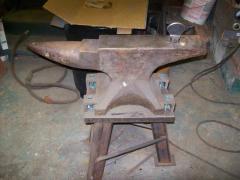
My winter project, new style 25lb Little Giant hammer! Needs some restoring, but that's half fun of having it! 

100_0161.JPG

Nice!

How far did you go with it in the back of your truck?

whodoamb, just looked at yer profile.....Happy Birthday !  Nice hammer.  enjoy        Dave

  • Author

Didn't have to go to far,about 20 or so miles. About all the Ranger wanted! Had to take it apart to get it in the shop, but that was alright. Didn't plan on running it till I go through everything! Thanks for Birthday well wish hope to post photos as I rebuild. 
Join the conversation

You can post now and register later. If you have an account, sign in now to post with your account.

Guest
Reply to this topic...

Account

Navigation

Search

Search

Configure browser push notifications

Chrome (Android)
  1. Tap the lock icon next to the address bar.
  2. Tap Permissions → Notifications.
  3. Adjust your preference.
Chrome (Desktop)
  1. Click the padlock icon in the address bar.
  2. Select Site settings.
  3. Find Notifications and adjust your preference.