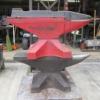
November 26, 201411 yr 118 lb Hay Budden recently acquired for the museum collection. The anvil is in great condition. I have not checked the serial number yet. Interesting that it came with a multi-slot half round swage that is saddle shaped, and fit this anvil perfectly. It even has a hole that will line up with the pritchel hole for a pin to drop in, keeping it from moving. I am wondering if it was made by HB for this anvil, or was an aftermarket addition. There are no marking that I can find on the swage.
November 26, 201411 yr That's a great idea for a swage block! I'll have to move that up to the top of the list of 'to do' projects....
November 26, 201411 yr Greetings Josh, Sweet lil HB ... You sure know how to find them .. I guess this means that I wii have to buy another lantern... Don't know if I like the idea of a large swage on the face of the anvil flop rattle and bounce. Forge on and make beautiful things Jum
November 27, 201411 yr Author The swage block covers about half of the face, and is a perfect fit. It does not rattle or bounce. The hole in it lines up perfectly with the pritchel hole, and a bolt can easily be dropped in to keep it from moving. I was wondering in it could have been a factory item, since the fit on this anvil is so good. It probably weights about 10 lbs. I will get an exact weight tomorrow.
Join the conversation
You can post now and register later. If you have an account, sign in now to post with your account.