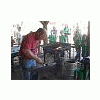
May 20, 201115 yr Bryce is here from Canada and will be staying with Brian and Karen for a while. He seems to be a level headed gentleman, and has learned a lot in his travels. He got his chance to make a hammer yesterday and did a good job striking. Again, I was working on the coal trailer, but stopped to take pictures often. See if you can tell the advantage of Brians newest set of hammer tongs in a couple of these pics. https://picasaweb.google.com/LDWynn/BryceSHammer#
May 20, 201115 yr I see that the tongs have a much longer reach, the jaws are longer, so you can grab any part of the hammer from one side. I just made a set of hammer tongs last weekend more like the old design, they seem to work well I will be making more when I find time. my tongs Fe-wood's tongs
May 20, 201115 yr That is one sweet looking hammer! How much does that one weigh? I saw no difference with those tongs... Even my tongs have that reach... so maybe it was new before me? Any way... it looks like you all have had a great time so far! Bryce looks like he is having a smashing time. That is one heck of a big trailer... how many tons are you planning to load that with? alec
May 21, 201115 yr My striking could have been better but I had fun and the hammer turned out nice. everything has been great down here and I have learned quite a bit
Join the conversation
You can post now and register later. If you have an account, sign in now to post with your account.