December 22, 200916 yr When they get old sometimes the horn just falls off, ask Frosty. Actually I think they cut the horn off to use as a drift for that big hole in the top.
December 22, 200916 yr I've heard that up in alaska, the great white....birch comes and takes them away from naughty kids!!
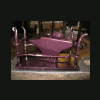
December 22, 200916 yr Author i forged a square horn for it works great and that anvil is the quietest i have ever beaten on but as i asked what kind is it some think its a moushole from the 1850s or newer
December 22, 200916 yr That looks like a Wilkinson anvil with the horn broke off. That happened sometimes on older anvils because the horn was forge welded on and it may not have been a very good weld. Not that forge welding is inherently weak just that they did not do a good job.
December 22, 200916 yr I've heard that it was common during the Civil War for Union Soldiers to break the horn off of anvils found in Confederate states to interfere with the making of horseshoes. Of course that would only apply to anvils found in the southern US for the most part.
December 22, 200916 yr Either that or was used on a very cold morning with a very big hammer. In Ottawa not surprising. I have heard of blacksmiths heating the anvils up before using in the wintertime.
Join the conversation
You can post now and register later. If you have an account, sign in now to post with your account.