PapaC
Members
-
Joined
-
Last visited
-
Fantastic video. So much debate over tools and procedures in the West. We'd do well to just practice some of this!
-
Hi Nick. I'm new to the site also. Welcome!
-
Thanks for the comments everyone. I really appreciate it all. Glad to be a part of this site and continue to learn and practice.
-
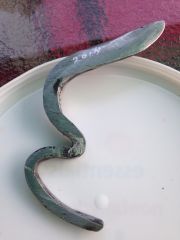 My first forged piece finished today for my dad for Father's Day.
© 2014 CM
-
Hi everyone. I'm new to the forum and to smithing in general and recently built a small propane coffee can forge. I made this for my dad for Father's Day and just finished it today. I filed the bevel after heating to an orange glow then put it back it. It's from rebar which actually hardened quite well. The edge was quenched in oil and after heating the entire piece, was quenched in water. After which I used a belt sander to tune the edge and clear brighten up the rest. The final sharpening was on a 4 level diamond stone and I finished it with a dremel polisher loaded with Renaissance Wax to protect. My dad has horses and always cutting hay bales so this is a quickie two finger knife to cut the twine. (While testing I cut a good slice in my finger through 5 layers of cotton) :o I'm going to tell him I poured my blood and sweat into making it. haha I never knew it could be so much fun. Thanks for looking.