Dylan the Bruce
Members
-
Joined
-
Last visited
-
Simple and effective. I like it!
-
Excellent find. Looks like some really interesting material. Thanks!
-
Beautiful knife. I really like the box elder burl. Very nice work!
-
Thanks for the warm welcome everyone! The i-beam was nailed and strapped down so it didn't move and as long as you were right over the quarter inch vertical section it wasn't so bad :D And yes, we have fishermen lining the banks of the mighty Big Walnut. It is most certainly the time of the white bass.
-
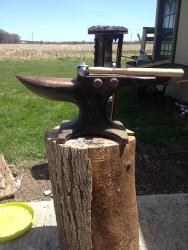
Here is mine. It's a Cliff Carroll 70lb anvil with turning cams and a wide face. I've been using a piece of i-beam but this is way better!
-
As the weather has started to warm up I've been messing around with some very basic smithing. It's been a blast so far! I've got a forge built out of some pipe and an old truck rotor. Its tiny and limits what I can do but it works for right now. I've been forging about two months now and for most of that time have been using a 1' length of i-beam as an anvil. That too, felt very limiting and just this week I bought a 70 lb cliff carroll wide face. I know it isn't an ideal blacksmithing anvil but the price was fantastic and its loads better than what I had. Plus I'm just making small things for now and its portable. I've really enjoyed this forum and figured I might as well start posting! Dylan