Skip to content
View in the app

A better way to browse. Learn more.

I Forge Iron

A full-screen app on your home screen with push notifications, badges and more.

To install this app on iOS and iPadOS
  1. Tap the Share icon in Safari
  2. Scroll the menu and tap Add to Home Screen.
  3. Tap Add in the top-right corner.
To install this app on Android
  1. Tap the 3-dot menu (⋮) in the top-right corner of the browser.
  2. Tap Add to Home screen or Install app.
  3. Confirm by tapping Install.

Touchmark

Featured Replies

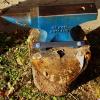
So I decided to try my hand at a quick touchmark. I wasn't sure if anyone was using an N which I'm sure is being or has been so I did a backwards one just to see how hard it would be to file in and if it would work. 

image.jpg

image.jpg

I have been thinking of making one myself. Nice work Nick. 

Try to get the letter cut with a square edge rather than sloped as you've got it.  It takes less force to get them to leave a stronger impression.

It doesn't take much depth either so you don't need to remove much from what you've got.  A small chisel would likely do the trick.

  • Author

Thanks Das, gotta keep me posted if you try one.

rockstar, thanks for the tip, it worked better than I thought but I will try cutting the edges a bit with a chisel a bit.
Join the conversation

You can post now and register later. If you have an account, sign in now to post with your account.

Guest
Reply to this topic...

Account

Navigation

Search

Search

Configure browser push notifications

Chrome (Android)
  1. Tap the lock icon next to the address bar.
  2. Tap Permissions → Notifications.
  3. Adjust your preference.
Chrome (Desktop)
  1. Click the padlock icon in the address bar.
  2. Select Site settings.
  3. Find Notifications and adjust your preference.