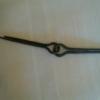
December 28, 201213 yr I've been focusing on making tools lately with a goal of making my own hammer. - decided to give the hammer tongs a go. Following Brian's tutorial on making hammer tongs. This is my first set of tongs. I've always been intimidated by tongs but the tutorial made it quite doable. I had a slight problem with making the tong halves exact and the hammer finish is not that great. I really like the lightnes and spring in the riegns. Here's a few pics.
December 28, 201213 yr Looking good! Hard to tell the size, I think I made my pair a bit too small. What diameter spring did you use?
December 28, 201213 yr Nice tongs! Can you share where the tutorial can be found? I did a quick search of the forum but only found this post... my bad... found it http://www.iforgeiron.com/topic/11066-hammer-making-tongs/?hl=tongs
December 28, 201213 yr Author Tubbe the riegns from center of rivet to the end are 11" and 5" from center of rivet to tip of bits. @retty much the same size as the pair in Brians post. I picked up a 2" round x 4" great gripping. But I do see a glove being used when being used with a yellow hot hammer blank.
December 29, 201213 yr When I took my class with Brian we wore welding gloves on our tong hands for a good bit of the work because you need to hold the drift and to forge the cheeks on the head (drift is used like a swage/mandrel) and to reset the hammer you flip the drift so it is struck side down and slam it on the anvil, causing scale to drop on your hand.... you only forget the glove for one reset.... trust me. Joah
Join the conversation
You can post now and register later. If you have an account, sign in now to post with your account.