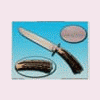
December 4, 201015 yr Here is a new chef's knife I just finished up. Blade is 11.75" W-2 tool steel with a nice hamon. The collar is 416 stainless, handle is double dyed and stabilized box elder burl with a stainless and copper mosaic pin to set it all off. OAL is 17" This knife is surprisingly light in the hand. The blade thickness is .155 at the ricasso. This will make my daughters boyfriend really nice Christmas present. Thanks for looking
December 4, 201015 yr WOW. I love the looks of the handle. He should be proud to get a knife like that. :)
December 4, 201015 yr beautiful handle..love the hamon in the blade also ! Is ur daughter's BF a chef? Gene
December 4, 201015 yr Beautiful! That's going to be one happy boyfriend. Hope you expect him to get the idea that you like him.
December 5, 201015 yr Author No he is not a chef. He had me make one for his fathers birthday and liked it so much he almost kept it. So my daughter asked if I would make him one. This one turned out much better than his dads. I think he might get the hint, but if not I can always use it for another purpose ;)
Join the conversation
You can post now and register later. If you have an account, sign in now to post with your account.