Skip to content
View in the app

A better way to browse. Learn more.

I Forge Iron

A full-screen app on your home screen with push notifications, badges and more.

To install this app on iOS and iPadOS
  1. Tap the Share icon in Safari
  2. Scroll the menu and tap Add to Home Screen.
  3. Tap Add in the top-right corner.
To install this app on Android
  1. Tap the 3-dot menu (⋮) in the top-right corner of the browser.
  2. Tap Add to Home screen or Install app.
  3. Confirm by tapping Install.

Seffers93

Members
  • Joined

  • Last visited

Everything posted by Seffers93

  1. Great info everyone, much appreciated. Looks like I’ll be loading up a couple tree stumps to pick from. Also great call for tipping it on its side. That makes a lot of sense. I’ll upload an update in a couple days. Thanks again guys
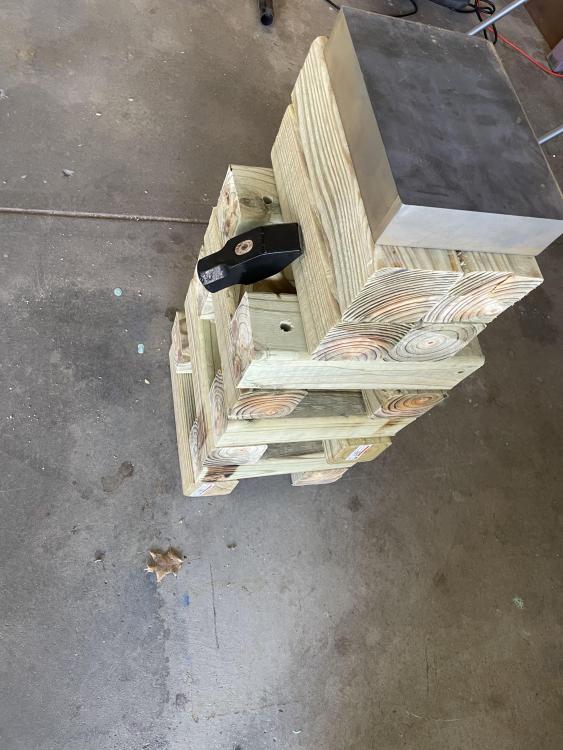
  2. New knife maker here. I’ve gotten comfortable with stock removal and have been dying to get going on some San Mai. Went and bought a cheap welder for the billet stacks and found this almost perfectly flat piece of steel, 2” thick. Maybe a little more. Stacked some 4x4s for a stand.. but then when I was walking my dog, I found tons of tree stumps on this trail I take. Wonder if that would make the banging a little quieter for the neighbors.. thoughts?
Account

Navigation

Search

Search

Configure browser push notifications

Chrome (Android)
  1. Tap the lock icon next to the address bar.
  2. Tap Permissions → Notifications.
  3. Adjust your preference.
Chrome (Desktop)
  1. Click the padlock icon in the address bar.
  2. Select Site settings.
  3. Find Notifications and adjust your preference.