Skip to content
View in the app

A better way to browse. Learn more.

I Forge Iron

A full-screen app on your home screen with push notifications, badges and more.

To install this app on iOS and iPadOS
  1. Tap the Share icon in Safari
  2. Scroll the menu and tap Add to Home Screen.
  3. Tap Add in the top-right corner.
To install this app on Android
  1. Tap the 3-dot menu (⋮) in the top-right corner of the browser.
  2. Tap Add to Home screen or Install app.
  3. Confirm by tapping Install.

colin455

Members
  • Joined

  • Last visited

Everything posted by colin455

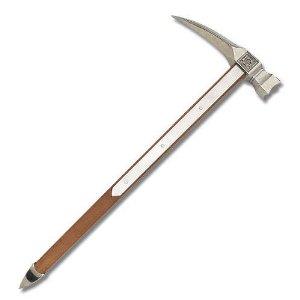
  1. you could make a style of spiked warhammer. Those look great. The spike side lends to the overall look.
  2. Glad for the add. Looking forward to trying out a new hobby to keep me away from the TV. Hot rodding is getting expensive due to the exchange and it's pretty hot for hunting. Picked up an old 185lb AJAX anvil from a couple provinces over and a post vice that I'm hoping to rebuild. It's just a little rusty, but looks intact. Watching videos and reading as much as possible. Just going to build a forge and give it a shot.
  3. I like it. Love the shelf/rack on top. Would a solid dark stain give it an "Old English " look? Like the rough as grown edges of the wood.
Account

Navigation

Search

Search

Configure browser push notifications

Chrome (Android)
  1. Tap the lock icon next to the address bar.
  2. Tap Permissions → Notifications.
  3. Adjust your preference.
Chrome (Desktop)
  1. Click the padlock icon in the address bar.
  2. Select Site settings.
  3. Find Notifications and adjust your preference.