Skip to content
View in the app

A better way to browse. Learn more.

I Forge Iron

A full-screen app on your home screen with push notifications, badges and more.

To install this app on iOS and iPadOS
  1. Tap the Share icon in Safari
  2. Scroll the menu and tap Add to Home Screen.
  3. Tap Add in the top-right corner.
To install this app on Android
  1. Tap the 3-dot menu (⋮) in the top-right corner of the browser.
  2. Tap Add to Home screen or Install app.
  3. Confirm by tapping Install.

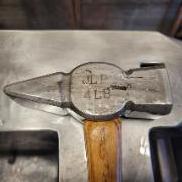
Small Beard, wide poll Throwing Hawk <photo heavy>

Featured Replies

I started this Sunday at a demo at an outdoor event called the Big Moe.  Mass outdoor exposition.. http://fawnsexpo.com/

It was a great place to setup and demo..   This started as 1/4X1.5"X8" and then added into it a 5160 insert..  Just over a 1lbs.. 

What should have taken 45minutes to forge took 8hrs as there was just so much conversation vs forging.. 

The handle was supplied at a normal catalog place.. Can't tell you where because I bought it from a friend.. 20180923_192337.thumb.jpg.51fa0391777623376461b9351959cf6e.jpg20180924_171201.thumb.jpg.8e603223829c2fe4cab227ee82c8559d.jpg20180924_172951.thumb.jpg.8dfd9bda336447960ab753cb42ed2bdd.jpg20180924_172955.thumb.jpg.6834e3a4766acfa9eae2af2871c61b25.jpg
20180924_180337.jpg

20180924_180342.jpg

20180924_180345.jpg

20180924_180347.jpg

20180924_180353.jpg

20180925_170654.jpg

20180925_170642.jpg

20180925_160659.jpg

20180925_170701.jpg

20180925_160832.jpg

20180925_165012.jpg

20180925_170705.jpg

20180925_165019.jpg

20180925_165025.jpg

20180925_170609.jpg

20180925_170629.jpg

20180925_170634.jpg

20180925_170708.jpg

Join the conversation

You can post now and register later. If you have an account, sign in now to post with your account.

Guest
Reply to this topic...

Account

Navigation

Search

Search

Configure browser push notifications

Chrome (Android)
  1. Tap the lock icon next to the address bar.
  2. Tap Permissions → Notifications.
  3. Adjust your preference.
Chrome (Desktop)
  1. Click the padlock icon in the address bar.
  2. Select Site settings.
  3. Find Notifications and adjust your preference.