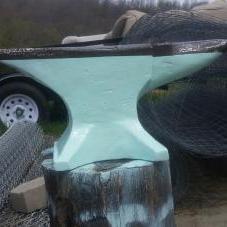
November 19, 20178 yr I saw this anvil and stand in the "Show me your anvil" section of the site. I was wondering what the ties on the anvil stand are called or if they are probably something that's custom made. I like the idea to use for a quick and easy stand. If anyone knows what they are and where to get them much appreciated.
November 19, 20178 yr Hand forged clamps. I use 1x1/8" bend 1" double, drill a hole (1/4 is enugh, 5/16-3/8 may look better) bend 90, this makes one end, repeat on the other end, on a round stump one works, on a square you have to make 4 bend around each corner. I personaly like to leave a tong on one end that runs index the other end, so you don't see raw wood.
November 19, 20178 yr Author Alright, might be a good first actual project to try. I've just been beating hot metal to see how it reacts so far. So a few bends shouldn't be too difficult.
November 19, 20178 yr So experience shows that bending the cut end back on its self as shown is not the best, see how it is bent in compare to the other side? If bent so the cut end is toward the opening instead of back toward the strap it is just a hair stiffer.
November 19, 20178 yr Author Yeah I see what you mean, so bending up and in, instead of up and out makes it more stable. Maybe even leave a small tong on both sides just don't make them overlap would probably make for a really good hold, so long as they don't dig into the wood
November 19, 20178 yr Be carful there, one slides under nice, two you have to make sure you don't run out of space
November 19, 20178 yr Author Yeah, that's what I was thinking. I'm gonna try and get some bars to try this with. I'll post some pictures with the results when I do.
Join the conversation
You can post now and register later. If you have an account, sign in now to post with your account.