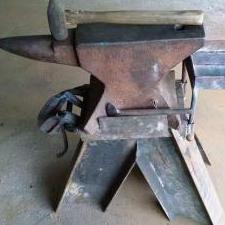
January 31, 201610 yr A friend gave me a bunch of Fair® rail anchors (from a rail-to-trail conversion near her home), and I had the idea of trying to make fullers from them. So, from the top: Anchor as found (with some brainstorming sketching) In progress, straightening out the bend. Forging complete, with bend squared off into a shank to fit the hardie hole, anchor cut in half, and top fitted with a rodded handle. And here are the top and bottom with the edges ground smooth. This gives a width of about 1/4". I think I should be able to upset the anchor's "blade" to make bigger radii, as well.
February 1, 201610 yr Very nice job seeing a tool inside the steel,i also like the fact you used the shape to your advantage putting the bottom fuller more toward the center of your anvil.Looks like they will work great.
April 13, 20215 yr Just occurred to me, I don’t need a portable hole. Heavy forging to fit a new Hardy to the Hardy hole in my anvil could break off the heel. Necessitating the purchase of a new larger anvil. Even SWMB couldn’t disagree with that could she? Just kidding, I would never try to break a perfectly fine Mouse Hole just because I wanted something new. Besides, I am not sure I could bust off the heel no matter how much I abused it.
Join the conversation
You can post now and register later. If you have an account, sign in now to post with your account.