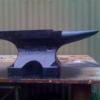
August 13, 201213 yr Just got my anvil home from the local foundry in Callington South Australia, made by the owner Jim. A true master of metals. Its just over 500 mm long. Thats my family name on the side.
August 13, 201213 yr Author Cheers.......Didnt ask to many questions about that.. He did mention he was pouring SG on that day ?? Ill catch up with Jim at the local this Friday, I can ask him then. Gave it a few smacks with a hammer tonight and it didnt leave any marks on it. I know he tempered the working faces. A local Copp had his Anvil stolen a whie aggo, he came to Jim to get a new one cast up and asked to have his name put on the anvil... The lads in the foundry had a bit of a chuccle over that one but it may have started a trend, as Jim didnt even ask If I wanted the mame. He just did it.... I love it to. Time to learn a bit about blacksmithing. First project is the front gates, 2 10 foot swinging gates with a few twisty bits she said.... Still looking for something nice to coppy.
Join the conversation
You can post now and register later. If you have an account, sign in now to post with your account.