Skip to content
View in the app

A better way to browse. Learn more.

I Forge Iron

A full-screen app on your home screen with push notifications, badges and more.

To install this app on iOS and iPadOS
  1. Tap the Share icon in Safari
  2. Scroll the menu and tap Add to Home Screen.
  3. Tap Add in the top-right corner.
To install this app on Android
  1. Tap the 3-dot menu (⋮) in the top-right corner of the browser.
  2. Tap Add to Home screen or Install app.
  3. Confirm by tapping Install.

Crown stag Bowie

Featured Replies

Finished a Bowie with a 8" blade of 1080 and stainless fittings. Thanks for looking

post-4209-12704828872528_thumb.jpg

post-4209-12704829081864_thumb.jpg

That is sweet! Really nice. What did you use/do for the finish?


Mitch

  • Author

That is sweet! Really nice. What did you use/do for the finish?


Mitch

Mitch, I finished the blade by hand rubbing to 600 grit paper. Guard hand rubbed to 800 grit then fine Scott bright pad.

That is a nice looking Bowie, good job!

A very well put together piece, I like the finish you used very much I may have to "borrow" it on my worker pieces. Mirror polish looks nice but on something that going to see rugged use I like the smooth grain finish.

Very nice knife! Where do you get your 1080 material?

  • Author

Very nice knife! Where do you get your 1080 material?

I got the 1080 from Alpha Knife Supply

Was this forged or stock-removed? Either way, very nice!!

  • 2 weeks later...

Finished a Bowie with a 8" blade of 1080 and stainless fittings. Thanks for looking

try making one using the crown as the guard or part of the guard,like this:)
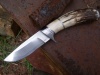
post-13710-12724071435887_thumb.jpg

Join the conversation

You can post now and register later. If you have an account, sign in now to post with your account.

Guest
Reply to this topic...

Account

Navigation

Search

Search

Configure browser push notifications

Chrome (Android)
  1. Tap the lock icon next to the address bar.
  2. Tap Permissions → Notifications.
  3. Adjust your preference.
Chrome (Desktop)
  1. Click the padlock icon in the address bar.
  2. Select Site settings.
  3. Find Notifications and adjust your preference.