Skip to content
View in the app

A better way to browse. Learn more.

I Forge Iron

A full-screen app on your home screen with push notifications, badges and more.

To install this app on iOS and iPadOS
  1. Tap the Share icon in Safari
  2. Scroll the menu and tap Add to Home Screen.
  3. Tap Add in the top-right corner.
To install this app on Android
  1. Tap the 3-dot menu (⋮) in the top-right corner of the browser.
  2. Tap Add to Home screen or Install app.
  3. Confirm by tapping Install.

Bosskode

Members
  • Joined

  • Last visited

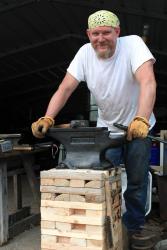
  1. This replaces my much loved and hated shaped rr track ASO. TFS 150lbs from Centaur Forge. I went to purchase a 100lbs anvil they said was in stock but someone got it the day before I arrived. They had ordered this one but thought it was too big. The guys sold this one to me for almost the same price. I am mounting it tonight and will try to spend some time on it this week. Should be a fun weekend ahead. By the way, thank all of you who post and share advice and experience freely. It feels great when I find a post speaking directly to questions I have with answers that are to the point yet not dismissive. It seems that many of the contributors here recall when they were new to the skill. For that I am very grateful. Happy hammering folks, BK
Account

Navigation

Search

Search

Configure browser push notifications

Chrome (Android)
  1. Tap the lock icon next to the address bar.
  2. Tap Permissions → Notifications.
  3. Adjust your preference.
Chrome (Desktop)
  1. Click the padlock icon in the address bar.
  2. Select Site settings.
  3. Find Notifications and adjust your preference.