Skip to content
View in the app

A better way to browse. Learn more.

I Forge Iron

A full-screen app on your home screen with push notifications, badges and more.

To install this app on iOS and iPadOS
  1. Tap the Share icon in Safari
  2. Scroll the menu and tap Add to Home Screen.
  3. Tap Add in the top-right corner.
To install this app on Android
  1. Tap the 3-dot menu (⋮) in the top-right corner of the browser.
  2. Tap Add to Home screen or Install app.
  3. Confirm by tapping Install.

dennis_kearns

Members
  • Joined

  • Last visited

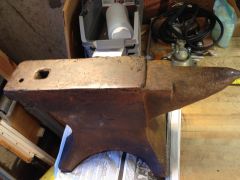
  1. Heres My anvil I picked it up a few weeks ago. Its a cast Iron Star anvil from the mid 1800s http://www.iforgeiron.com/gallery/image/37502-star-anvil/ I havent figured out my stand yet, Most likely It will be a Oak log to start.
  2. dennis_kearns replied to Glenn's topic in Vises
    Thanks I'll see what I can dig for know its usable up to about 3 inchs which is plenty for my current needs
  3. dennis_kearns replied to Glenn's topic in Vises
    since I have to admit that my knowledge and resources are limited is there somewhere to repair or replace screw & screw box

Account

Navigation

Search

Search

Configure browser push notifications

Chrome (Android)
  1. Tap the lock icon next to the address bar.
  2. Tap Permissions → Notifications.
  3. Adjust your preference.
Chrome (Desktop)
  1. Click the padlock icon in the address bar.
  2. Select Site settings.
  3. Find Notifications and adjust your preference.