

Skip to content
View in the app

A better way to browse. Learn more.

I Forge Iron

A full-screen app on your home screen with push notifications, badges and more.

To install this app on iOS and iPadOS
  1. Tap the Share icon in Safari
  2. Scroll the menu and tap Add to Home Screen.
  3. Tap Add in the top-right corner.
To install this app on Android
  1. Tap the 3-dot menu (⋮) in the top-right corner of the browser.
  2. Tap Add to Home screen or Install app.
  3. Confirm by tapping Install.

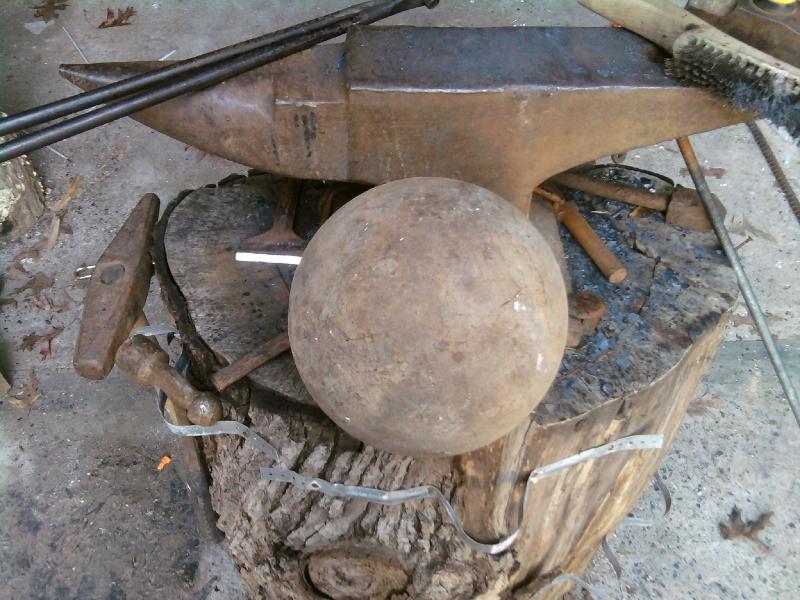
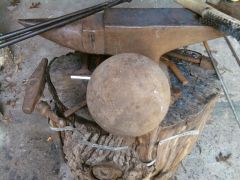
round anvil1.jpg

New Toy. I don't think this is a round anvil but, a round anvil is what it's going to be used for. I was at the scrap yard today and was about back to my truck when I spotted it. It's steel and NOT cast. I've hit it with a welding slag hammer and didn't even mark it. Also hit it with my 4 lb hammer and didn't mark it. It's sitting next to a #150 Hay-Budden for comparison. I'm guessing the weight is around #100 or more.

  • From the category:

    Member Galleries

    · 11,262 images

    Account

    Navigation

    Search

    Search

    Configure browser push notifications

    Chrome (Android)
    1. Tap the lock icon next to the address bar.
    2. Tap Permissions → Notifications.
    3. Adjust your preference.
    Chrome (Desktop)
    1. Click the padlock icon in the address bar.
    2. Select Site settings.
    3. Find Notifications and adjust your preference.