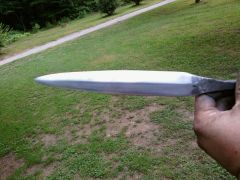
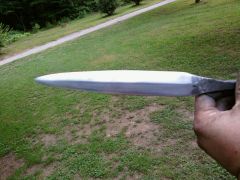
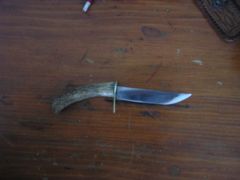
First Atemtp At A Dagger Share https://www.iforgeiron.com/gallery/image/35035-first-atemtp-at-a-dagger/ Share on LinkedIn Share on X Share on Facebook {lang="reddit_text" Share via email Share on Pinterest More sharing options... Followers Not to bad for my first double edged blade. It was made square headed rr tie bolt from the 1920's or older. It tempered out well and seems to hold a edge very well. Will post more pics when finished.
Harley Members June 12, 201016 yr Author stats Nice work....Clearly you are not located here in Massachusetts. Had you made that in the Bay Stete it would land you in the slammer. Double edge blades are illegal in Mass. but then everything is illegal in Massachusetts...........
sheridan Members June 20, 201016 yr Author stats Nice work....Clearly you are not located here in Massachusetts. Had you made that in the Bay Stete it would land you in the slammer. Double edge blades are illegal in Mass. but then everything is illegal in Massachusetts........... You should check if it is legal to make a knife that is in effect double bladed (i.e. both sides tapered) but leave one edge blunted. I believe that is legal in some states, but could be wrong. This gives you that cool double bladed look while not having something illegal. Again always check thoroughly first.


Recommended Comments
Join the conversation
You can post now and register later. If you have an account, sign in now to post with your account.