Tucker Shew
Members
-
Joined
-
Last visited
-
My plan is to drill out the 1/4" BSP thread but drill it out large enough to fit the injector in and then just weld a nut on.
-
Exactly. I did end up find that lamp pipe on amazon, thank you very much for that one. The only place i could find a bulkhead fitting long enough was on ebay but the fittings were from the UK and it would've cost around $40
-
Thank you for responding. The pipe nipple is 1/4 inch by 4 inches long. during the threading process the bottom-most blades of the die broke off.(The die i have is a cutting die not a chasing die) The reason I'm threading this nipple is to screw it down through that top part so i can not only use as a way to get the propane into the venturi, but also as a form of oxygen control. i was originally going to use an extended hydraulic bulkhead fitting but the only ones long enough were from the EU. I have all the other parts this is one thing that has given me the most trouble. What my biggest question is, should i still try the pipe nipple, or is there a better way? Thank you.
-
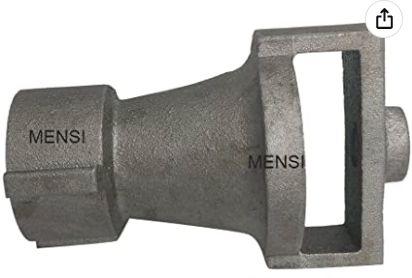
Hello! I've recently purchased a venturi on amazon and i wanted to know how i can set it up. I've tried threading a pipe nipple but ended up breaking the die, so i was wondering if there was a better way of going about this or just trying again. Thanks. Here's the link to the venturi: Link removed