ElijahJMHutchinson
Members
-
Joined
-
Last visited
Everything posted by ElijahJMHutchinson
-
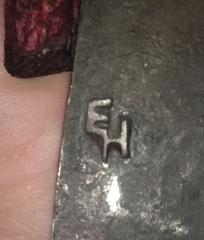 This touchmark represents my forge, located in the PNW United States. It's a classic western style brand "EH", with "E" in the upper left of the imprint and "H" in the lower right. The letters connect by their corners. This touchmark leaves a negative imprint. Elijah JM Hutchinson
 -
Hey guys, I'm new here and this is my first post. I have a forgemaster ferriers forge that I've been running for a while and the depth of the forge prevents me from working longer pieces of steel. I was thinking of cutting a 2" hole out the back of the forge so that I could use it for knife making as well as other long projects. Has anyone done this or does anyone have a recommendation for me? I am hesitant to cut a hole in my 600 dollar forge without asking experienced folks about it. Thank you guys!
