Skip to content
View in the app

A better way to browse. Learn more.

I Forge Iron

A full-screen app on your home screen with push notifications, badges and more.

To install this app on iOS and iPadOS
  1. Tap the Share icon in Safari
  2. Scroll the menu and tap Add to Home Screen.
  3. Tap Add in the top-right corner.
To install this app on Android
  1. Tap the 3-dot menu (⋮) in the top-right corner of the browser.
  2. Tap Add to Home screen or Install app.
  3. Confirm by tapping Install.

Ironbelly

Members
  • Joined

  • Last visited

Everything posted by Ironbelly

  1. Sorry I seem to have left out an important detail. I meant for securing the anvil to the stand. The stand isn't going to run away Something like this. Sorry for the first grader artwork. I see the comments about melting the straps and yeah, seems like I wasn't thinking that one through.
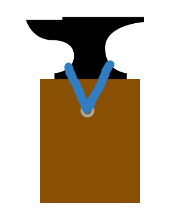
  2. Hi everyone. I just got my first real anvil and I built a stand for it out of wood 4x4s. Is there anything wrong with putting some eye hooks on the sides of the stand and using ratchet straps pulling in opposing directions to secure it? Is there a better/easier way that I'm not thinking of? I know you can use chains and lag bolts but I already have the straps.

Account

Navigation

Search

Search

Configure browser push notifications

Chrome (Android)
  1. Tap the lock icon next to the address bar.
  2. Tap Permissions → Notifications.
  3. Adjust your preference.
Chrome (Desktop)
  1. Click the padlock icon in the address bar.
  2. Select Site settings.
  3. Find Notifications and adjust your preference.