Skip to content
View in the app

A better way to browse. Learn more.

I Forge Iron

A full-screen app on your home screen with push notifications, badges and more.

To install this app on iOS and iPadOS
  1. Tap the Share icon in Safari
  2. Scroll the menu and tap Add to Home Screen.
  3. Tap Add in the top-right corner.
To install this app on Android
  1. Tap the 3-dot menu (⋮) in the top-right corner of the browser.
  2. Tap Add to Home screen or Install app.
  3. Confirm by tapping Install.

Vullgaren

Members
  • Joined

  • Last visited

  1. Thanks Frosty! They're few and far between where I live in NZ. I've been scouring all the second hand shops on the Manawatu. What on earth is a slab handle by the way?
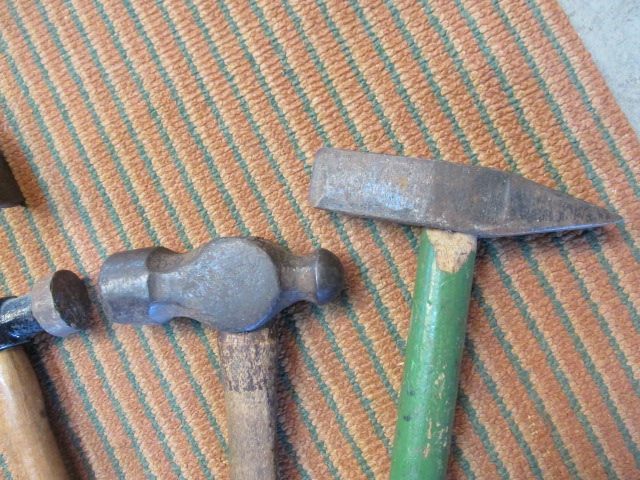
  2. Hey guys a second hand dealer just flicked these two off to me for 5$ each. Any thoughts on what the hammer on the right would be used for or could be made into? I'm a newbie so excuse my novice questions haha
  3. That's awesome, it's a really nice place up there! It's quite funny si far the other blacksmiths I've come across have been at the opposite ends if nz, there's no one near the middle haha
  4. Hi guys I'm from New Zealand and im just starting out in the craft. I've been learning alot over the past year and now I've decided to reach out and try find someone from NZ and to try get a idea of how alive blacksmithing is here. if you're from NZ feel free to let me know what part your from! I'm from Palmerston North myself!
Account

Navigation

Search

Search

Configure browser push notifications

Chrome (Android)
  1. Tap the lock icon next to the address bar.
  2. Tap Permissions → Notifications.
  3. Adjust your preference.
Chrome (Desktop)
  1. Click the padlock icon in the address bar.
  2. Select Site settings.
  3. Find Notifications and adjust your preference.