Skip to content
View in the app

A better way to browse. Learn more.

I Forge Iron

A full-screen app on your home screen with push notifications, badges and more.

To install this app on iOS and iPadOS
  1. Tap the Share icon in Safari
  2. Scroll the menu and tap Add to Home Screen.
  3. Tap Add in the top-right corner.
To install this app on Android
  1. Tap the 3-dot menu (⋮) in the top-right corner of the browser.
  2. Tap Add to Home screen or Install app.
  3. Confirm by tapping Install.

HomeSkillet

Members
  • Joined

  • Last visited

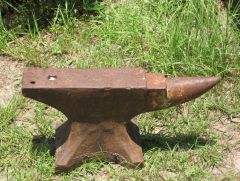
  1. I took some pics . Here is what I made out . wilkson's solid anvil then in the middle says Patent with crossed shoves? Decent pic of on pic 6. Anything anyone can tell me would be awesome
  2. Hello all. I have about a 200 lb anvil. It looks forged with no casting marks. Don't know if there are markings will look tomorrow. But It has about 3yrs of rust / exposed to the outside. Its not too bad. Clean sides and horn. Will take a picture tomorrow too. But How do I clean it up. I don't use it but got it from my grandfather's death. And you never know Might start pounding metal myself one day. If Anyone could help it would be a great help. And how do I put a Anvil in mothballs?
Account

Navigation

Search

Search

Configure browser push notifications

Chrome (Android)
  1. Tap the lock icon next to the address bar.
  2. Tap Permissions → Notifications.
  3. Adjust your preference.
Chrome (Desktop)
  1. Click the padlock icon in the address bar.
  2. Select Site settings.
  3. Find Notifications and adjust your preference.