Skip to content
View in the app

A better way to browse. Learn more.

I Forge Iron

A full-screen app on your home screen with push notifications, badges and more.

To install this app on iOS and iPadOS
  1. Tap the Share icon in Safari
  2. Scroll the menu and tap Add to Home Screen.
  3. Tap Add in the top-right corner.
To install this app on Android
  1. Tap the 3-dot menu (⋮) in the top-right corner of the browser.
  2. Tap Add to Home screen or Install app.
  3. Confirm by tapping Install.

wksjr66

Members
  • Joined

  • Last visited

  1. I just want to thank everyone who responded and helped me ID this anvil. Thanks Again, Bill:D
  2. I will try looking again maybe I can find something! So I guess it is a 72 or 73lb. anvil, is that a pretty good size to start with? Thanks for your Help:)
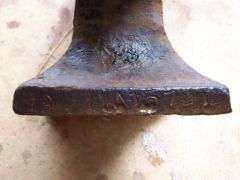
  3. Thanks BT, should there be any other markings I could look for?
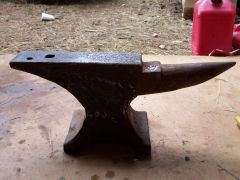
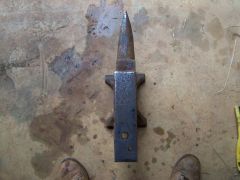
  4. That is my anvil but i cant find a makers name on it.
  5. Thanks Glen, I was able to upload to my gallery but I dont know how to put the pics in my posting.:confused:
  6. I'm sorry the pics im trying to upload are toobig to send. I will try again:confused:
  7. I was just wondering if anyone could help me identify my anvil for me? Its weighs approx. 70lbs and there are some letters and numbers on it. Thanks for any help!! Bill:)
Account

Navigation

Search

Search

Configure browser push notifications

Chrome (Android)
  1. Tap the lock icon next to the address bar.
  2. Tap Permissions → Notifications.
  3. Adjust your preference.
Chrome (Desktop)
  1. Click the padlock icon in the address bar.
  2. Select Site settings.
  3. Find Notifications and adjust your preference.