Skip to content
View in the app

A better way to browse. Learn more.

I Forge Iron

A full-screen app on your home screen with push notifications, badges and more.

To install this app on iOS and iPadOS
  1. Tap the Share icon in Safari
  2. Scroll the menu and tap Add to Home Screen.
  3. Tap Add in the top-right corner.
To install this app on Android
  1. Tap the 3-dot menu (⋮) in the top-right corner of the browser.
  2. Tap Add to Home screen or Install app.
  3. Confirm by tapping Install.

radar67

Members
  • Joined

  • Last visited

  1. I just got a Trenton Anvil. The serial number is A19185. I think it is from 1900, is this correct? Anyone have the book with the information in it? I will get some pictures later today. It is in pretty good shape.
  2. Is this the forge you're talking about?
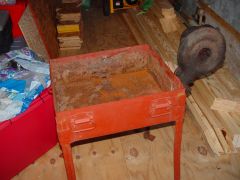
  3. There is signs of hinges for a lid and a latch, so it could be an old cavalry forge. I won't have to worry too much with cold weather down here in South, MS. :)
  4. This forge followed me home from an antique store. Does anyone know if the gears in the blower should be greased? This is my first post. Looks like a lot of good info here.
  5. Images added to a gallery album owned by radar67 in Members Gallery

Account

Navigation

Search

Search

Configure browser push notifications

Chrome (Android)
  1. Tap the lock icon next to the address bar.
  2. Tap Permissions → Notifications.
  3. Adjust your preference.
Chrome (Desktop)
  1. Click the padlock icon in the address bar.
  2. Select Site settings.
  3. Find Notifications and adjust your preference.