Skip to content
View in the app

A better way to browse. Learn more.

I Forge Iron

A full-screen app on your home screen with push notifications, badges and more.

To install this app on iOS and iPadOS
  1. Tap the Share icon in Safari
  2. Scroll the menu and tap Add to Home Screen.
  3. Tap Add in the top-right corner.
To install this app on Android
  1. Tap the 3-dot menu (⋮) in the top-right corner of the browser.
  2. Tap Add to Home screen or Install app.
  3. Confirm by tapping Install.

Gamjar

Members
  • Joined

  • Last visited

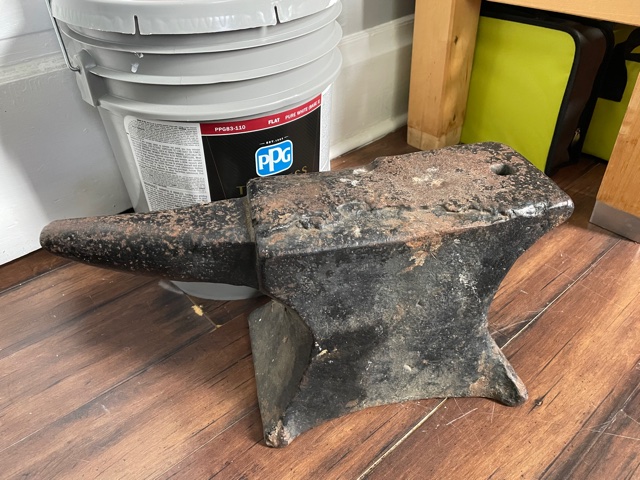
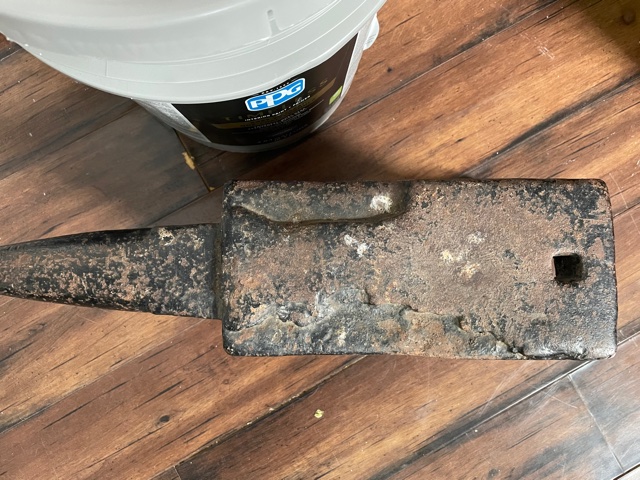
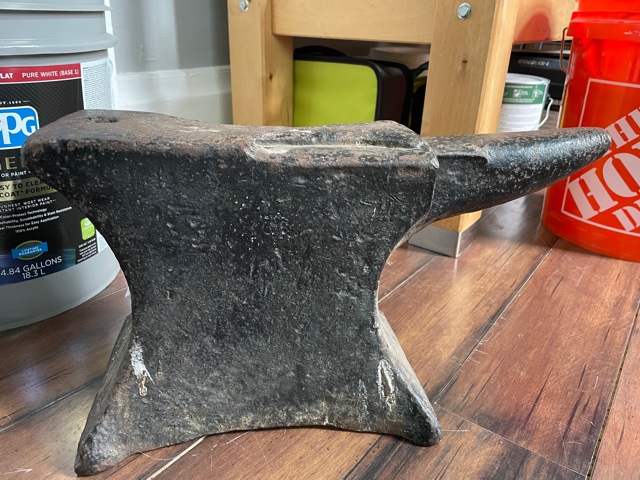
  1. I recently came into possession of this ole anvil, and was looking for some other opinions on manufacturer, age, etc. It's in pretty rough shape, and I could not decipher any markings on it. Weighed in at 116 lbs. Based on this thread, it looks like it might be a colonial Alsop. I'm only starting to get into this field so I don't have the knowledge base to know for sure. Any input would be great!

Account

Navigation

Search

Search

Configure browser push notifications

Chrome (Android)
  1. Tap the lock icon next to the address bar.
  2. Tap Permissions → Notifications.
  3. Adjust your preference.
Chrome (Desktop)
  1. Click the padlock icon in the address bar.
  2. Select Site settings.
  3. Find Notifications and adjust your preference.