Skip to content
View in the app

A better way to browse. Learn more.

I Forge Iron

A full-screen app on your home screen with push notifications, badges and more.

To install this app on iOS and iPadOS
  1. Tap the Share icon in Safari
  2. Scroll the menu and tap Add to Home Screen.
  3. Tap Add in the top-right corner.
To install this app on Android
  1. Tap the 3-dot menu (⋮) in the top-right corner of the browser.
  2. Tap Add to Home screen or Install app.
  3. Confirm by tapping Install.

Lans Link

Members
  • Joined

  • Last visited

Everything posted by Lans Link

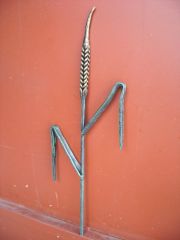
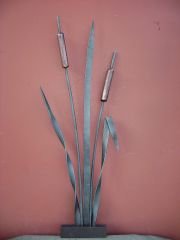
  1. Hello folks, here is my wheat . I did it just last saturday.Hope you like it.
  2. Hello Artemis .The gate is very nice - great stuff.I saw it in the other forum and I know you from there.May be you also remember me. Regards Lans
  3. 67

    Lans Link posted a gallery image in Member Galleries
  4. Lans Link posted a gallery image in Member Galleries
  5. 127

    Lans Link posted a gallery image in Member Galleries
  6. Lans Link posted a gallery image in Member Galleries
  7. Lans Link posted a gallery image in Member Galleries
  8. Lans Link posted a gallery image in Member Galleries
  9. Lans Link posted a gallery image in Member Galleries
  10. Lans Link posted a gallery image in Member Galleries
  11. Lans Link posted a gallery image in Member Galleries
  12. Lans Link posted a gallery image in Member Galleries
  13. Lans Link posted a gallery image in Member Galleries
  14. Lans Link posted a gallery image in Member Galleries
  15. Lans Link posted a gallery image in Member Galleries
  16. Lans Link posted a gallery image in Member Galleries
  17. Lans Link posted a gallery image in Member Galleries
  18. Lans Link posted a topic in Introduce Yourself
    Hello folks, I found this forum acciddentally,went through and see the clock - two hours were gone .Great forum.I'm working with metal since 1993,and last 5-6 years most seriously with wrought iron and blacksmithing. I'll post some of my latest projects soon.I see one member from other forum - "Frosty" is also here - regards to him and to all members.See you soon.

Account

Navigation

Search

Search

Configure browser push notifications

Chrome (Android)
  1. Tap the lock icon next to the address bar.
  2. Tap Permissions → Notifications.
  3. Adjust your preference.
Chrome (Desktop)
  1. Click the padlock icon in the address bar.
  2. Select Site settings.
  3. Find Notifications and adjust your preference.