Skip to content
View in the app

A better way to browse. Learn more.

I Forge Iron

A full-screen app on your home screen with push notifications, badges and more.

To install this app on iOS and iPadOS
  1. Tap the Share icon in Safari
  2. Scroll the menu and tap Add to Home Screen.
  3. Tap Add in the top-right corner.
To install this app on Android
  1. Tap the 3-dot menu (⋮) in the top-right corner of the browser.
  2. Tap Add to Home screen or Install app.
  3. Confirm by tapping Install.

StatiCat

Members
  • Joined

  • Last visited

Everything posted by StatiCat

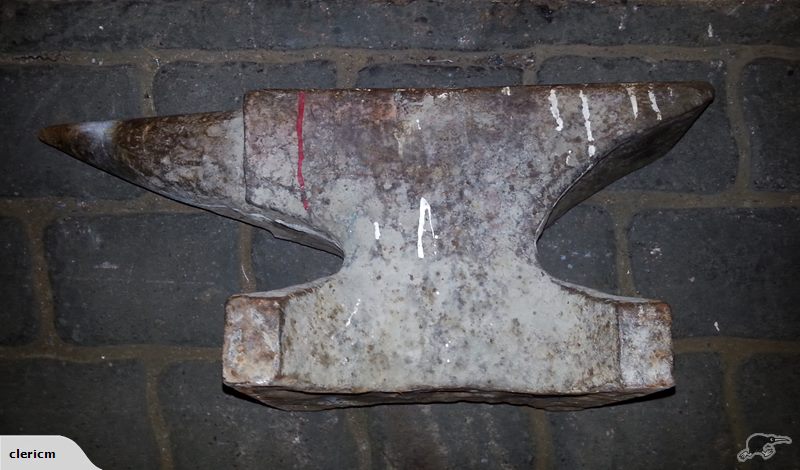
  1. Hi everyone. I feel rude asking for help on my first post, but I hope this can double as a introduction post. I've been doing a bit of smithing, but i have really been struggling with the piece of rail iron I use as an anvil. I live in NZ and there are plenty of chinese ASOs around, but very few big forged anvils. I found this while i was lurking of trademe (new zealands ebay). It claims to be a Peddinghaus, but i couldn't help but notice that the pattern didn't look German at all. I could be completely wrong. Link to the auction: http://www.trademe.co.nz/Browse/Listing.aspx?id=935503731 Any help greatly appreciated.

Account

Navigation

Search

Search

Configure browser push notifications

Chrome (Android)
  1. Tap the lock icon next to the address bar.
  2. Tap Permissions → Notifications.
  3. Adjust your preference.
Chrome (Desktop)
  1. Click the padlock icon in the address bar.
  2. Select Site settings.
  3. Find Notifications and adjust your preference.