
Johnnie C.
Members
-
Joined
-
Last visited
Everything posted by Johnnie C.
-
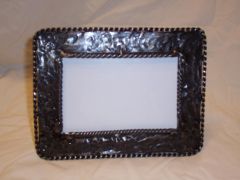 This is picture frame is made of 1inx1/4in flatbar. It oulined with 1/8in tig wire and the inside is outlined with 1/4in square stock that has been twisted.
 -
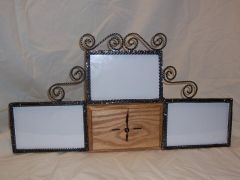 Scrolls made out of twisted tig wire and the clock is made of Oak
 -
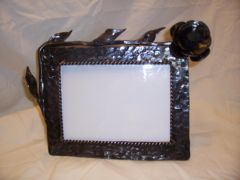 The frame is made 1inx1/4in flat bar, the stem and leaves are made of 3/8in round rod, and flower is 1/8in plate with a piece of a horseshoing rasp for the center. In side of the frame is oulined with 1/8in twisted tig wire.
 -
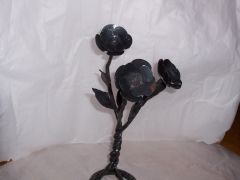 This flower is made of 3/8in round rod for the stems and the leaves. The pedals are 1/8in plate and the centers are made from a horseshoing rasp. The stand is 1/2in square stock.
 -
I wear contacts in the shop all the time. The only problem I have is sometimes they tend to try out, so I keep eye drop in my first aid cabnet. I personaly think its worth it.
-
If your looking for a gas forge to do alround projects i would suggest a forge master 2000 by Centaur Forge
-
I have been blacksmiting as a hobbie for about 2 years and I would like some help to learn how to do new things. I was wondering if anyone knew of someone in the Wichita surrounding area. I would appreciate the help. thanks, Johnnie
-
I'm a new member and I'm liking what I see. My hamster in my head has been running for a long time trying to come up with a design for a treadel hammer. Aprentice Man I realy like your design and now I have a idea of how to build it. Thanks